> For the complete documentation index, see [llms.txt](https://docs.foundryosd.com/llms.txt). Markdown versions of documentation pages are available by appending `.md` to page URLs; this page is available as [Markdown](https://docs.foundryosd.com/foundry-osd/customization/unattend.md).
# Unattend (custom answer files)
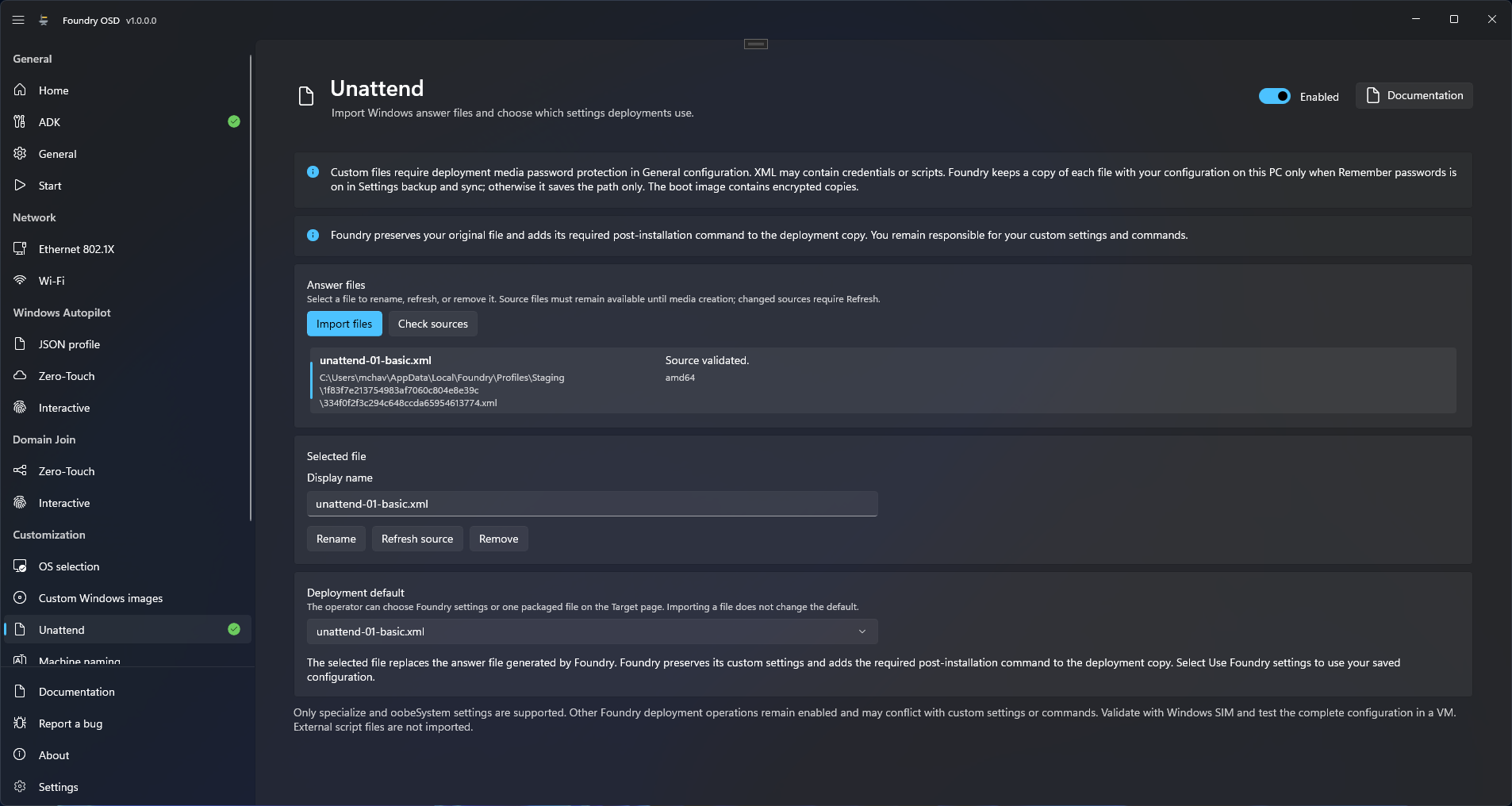
Use **Customization > Unattend** to put your own Windows answer files on the deployment media. The technician picks one in Foundry Deploy, and Windows then uses it instead of the answer file Foundry generates. Foundry keeps the file's settings. When the deployment needs one, it adds its post-installation command to the deployment copy, the copy of your file that Foundry Deploy writes to the target device.
Deployment default sets what Foundry Deploy preselects: Foundry settings or one of the imported files.
## Before you start
* Turn on [Password protection](/foundry-osd/general.md#password-protection). It is required for every custom answer file, even one without credentials.
* Write each file for the Windows architecture, edition and version you deploy, and validate it with Windows System Image Manager against that image. It must also follow the [Answer file rules](/foundry-osd/customization/unattend/answer-file-rules.md).
* Read [What a custom answer file overrides](#what-a-custom-answer-file-overrides): the computer name, Windows activation and the OOBE settings (OOBE is the series of Windows first-run screens) no longer come from Foundry.
## Import answer files
1. Open **Customization > Unattend** and turn on the switch in the page header.
2. Under **Answer files**, select **Import files** and choose one or more XML files. A file already in the list is skipped.
3. Select a file in the list. Under **Selected file**, change **Display name** and select **Rename**: the technician sees this name.
4. Under **Deployment default**, choose the file selected by default in Foundry Deploy, or keep **Use Foundry settings**.
5. Return to **Start** and [create the media](/foundry-osd/media.md).
Keep the source files in place until the media is created. Whether Foundry also keeps a copy of them with your saved configuration depends on **Remember passwords**: see [what is remembered](/foundry-osd/deployment-profiles.md#what-is-remembered).
| Button | Applies to | What it does |
| ------------------ | ----------------- | -------------------------------------------------------------------------------------------------- |
| **Check sources** | Every file | Checks that each source is still readable, valid and unchanged. It does not accept a changed file. |
| **Refresh source** | The selected file | Reads the file again and accepts its new content. Use it after you edit a source file. |
A missing, changed or invalid source blocks media creation. **Remove** takes the selected file off the list; the source file is not deleted. If it was the default, choose another one under **Deployment default** before you create media.
## What the technician sees
On **Target device** in Foundry Deploy, **Answer file** lists **Use Foundry settings** and every file on the media, with your default selected. With a custom file, **Computer name** is read-only and shows **Managed by answer file**. The confirmation before the disk is erased repeats the choice. See [Select the target](/foundry-deploy/target.md).
## What a custom answer file overrides
| Foundry setting | With a custom answer file selected |
| ----------------------------------------------------------------------------------------------------------------------------------------------------------------- | ------------------------------------------------------------------------------------------------------------------------------------------------------------------------------------------------------------------------------------------------------------------------------------------------------------------------------------------------------------------- |
| Answer file generated by Foundry | Replaced by yours. Foundry fills in nothing that your file leaves out; Windows or the image defaults apply. |
| Computer name from [Machine naming](/foundry-osd/customization/machine-naming.md) | Not applied. Set the name in your file. |
| [OOBE](/foundry-osd/customization/oobe.md) page, including privacy choices and local accounts | Not applied. |
| **Upload computer name to Autopilot** | Skipped. The hardware hash upload continues; only the deployment log mentions it. |
| Automatic Windows activation | Not attempted. |
| Windows Autopilot with a JSON profile or the interactive upload | The deployment is refused when the file contains one of the [blocking settings](/foundry-osd/customization/unattend/answer-file-rules.md#settings-that-block-windows-autopilot). |
| Zero-touch hardware hash upload | Not refused. Foundry Deploy warns that the upload does not guarantee enrollment. |
| Domain Join | Still runs. The file must set exactly one fixed `ComputerName` in the `specialize` pass of `Microsoft-Windows-Shell-Setup` and contain no `Microsoft-Windows-UnattendedJoin` component. Otherwise Foundry Deploy skips the join without a message on screen and the deployment continues: see [The join was skipped](/troubleshooting/domain-join.md#join-skipped). |
| Everything else: [Post-installation](/foundry-osd/customization/post-installation.md), AppX removals, AI components, optional features, drivers, network profiles | Still applied. Your settings and commands can conflict with them; Foundry does not detect that. |
## Rules for the file
Read [Answer file rules](/foundry-osd/customization/unattend/answer-file-rules.md) before you write a file. It gives the rules checked at import, [where Foundry adds its own command](/foundry-osd/customization/unattend/answer-file-rules.md#when-foundry-adds-its-command) when the deployment has work to do after the restart, and [the settings that block Windows Autopilot](/foundry-osd/customization/unattend/answer-file-rules.md#settings-that-block-windows-autopilot).
## Check the result
* In Foundry OSD, every file shows "Source validated." and no warning bar is displayed.
* On a test device, deploy with the file and confirm in Windows that its settings were applied. Foundry cannot tell whether Windows accepted them.
## Limits
* Only imported files are offered in Foundry Deploy. Scripts that your commands call are not put on the media, and Foundry does not install language resources the file asks for.
* The deployment copy stays on the target device as `C:\Windows\Panther\unattend.xml`, secrets included. Windows needs it until the `oobeSystem` pass is over, and Foundry does not delete it. See [Security and credentials](/reference/security-and-credentials.md).
## If something goes wrong
Messages in Foundry OSD, on the Unattend page:
| Message | What to do |
| ------------------------------------------------------------------------------------------------------------------------------------------------------------------------------ | -------------------------------------------------------------------------------------------------------------------------------------------------------------------- |
| "Enable deployment media password protection in General configuration to use custom answer files." | Turn on [Password protection](/foundry-osd/general.md#password-protection). |
| "Use valid Windows answer-file XML no larger than 4 MiB...", "Only specialize and oobeSystem settings are supported..." or "The file must declare a supported architecture..." | The file breaks one of the [rules checked at import](/foundry-osd/customization/unattend/answer-file-rules.md#rules-checked-at-import). Correct it and import again. |
| "Missing default - choose a replacement" | The default file was removed. Choose another file or **Use Foundry settings** under **Deployment default**. |
| "Some sources are missing, changed, or invalid. Refresh or remove these entries before creating media." | See [Source check messages](/foundry-osd/customization/unattend/answer-file-rules.md#source-check-messages). |
In Foundry Deploy, a refused file is explained in [A message under Answer file](/troubleshooting/deployment/before-deployment-starts.md#answer-file-rejected) and a deployment that stops on **Validate answer file** in [Answer file validation](/troubleshooting/deployment/checks-and-image-download.md#validate-answer-file). Failures in Windows Setup are in [After the restart troubleshooting](/troubleshooting/after-the-restart.md#windows-setup).
## Related
* [Answer file rules](/foundry-osd/customization/unattend/answer-file-rules.md)
* [Select the target](/foundry-deploy/target.md)
* [After the restart troubleshooting](/troubleshooting/after-the-restart.md)
* [Security and credentials](/reference/security-and-credentials.md)
---
# Agent Instructions
This documentation is published with GitBook. GitBook is the documentation platform designed so that both humans and AI agents can read, navigate, and reason over technical content effectively. Learn more at gitbook.com.
## Querying This Documentation
If you need additional information that is not directly available in this page, you can query the documentation by asking a question.
Perform an HTTP GET request on the following URL with the `ask` and `goal` query parameters:
```
GET https://docs.foundryosd.com/foundry-osd/customization/unattend.md?ask=&goal=
```
`ask` is the immediate question: it should be specific, self-contained, and written in natural language.
`goal` is what the user is ultimately trying to achieve, the reason they need the answer. Sharing it helps GitBook give you a better, more relevant answer. A goal is most helpful when it describes the outcome the user wants rather than restating the question. For example, with `ask=how do I create an API token`, a goal like `automate deployments from our CI pipeline` lets GitBook tailor the answer to that use case.
The response will contain a direct answer to the question and relevant excerpts and sources from the documentation.
Use this mechanism when the answer is not explicitly present in the current page, you need clarification or additional context, or you want to retrieve related documentation sections.