> For the complete documentation index, see [llms.txt](https://docs.foundryosd.com/llms.txt). Markdown versions of documentation pages are available by appending `.md` to page URLs; this page is available as [Markdown](https://docs.foundryosd.com/foundry-osd/customization/oobe.md).
# OOBE
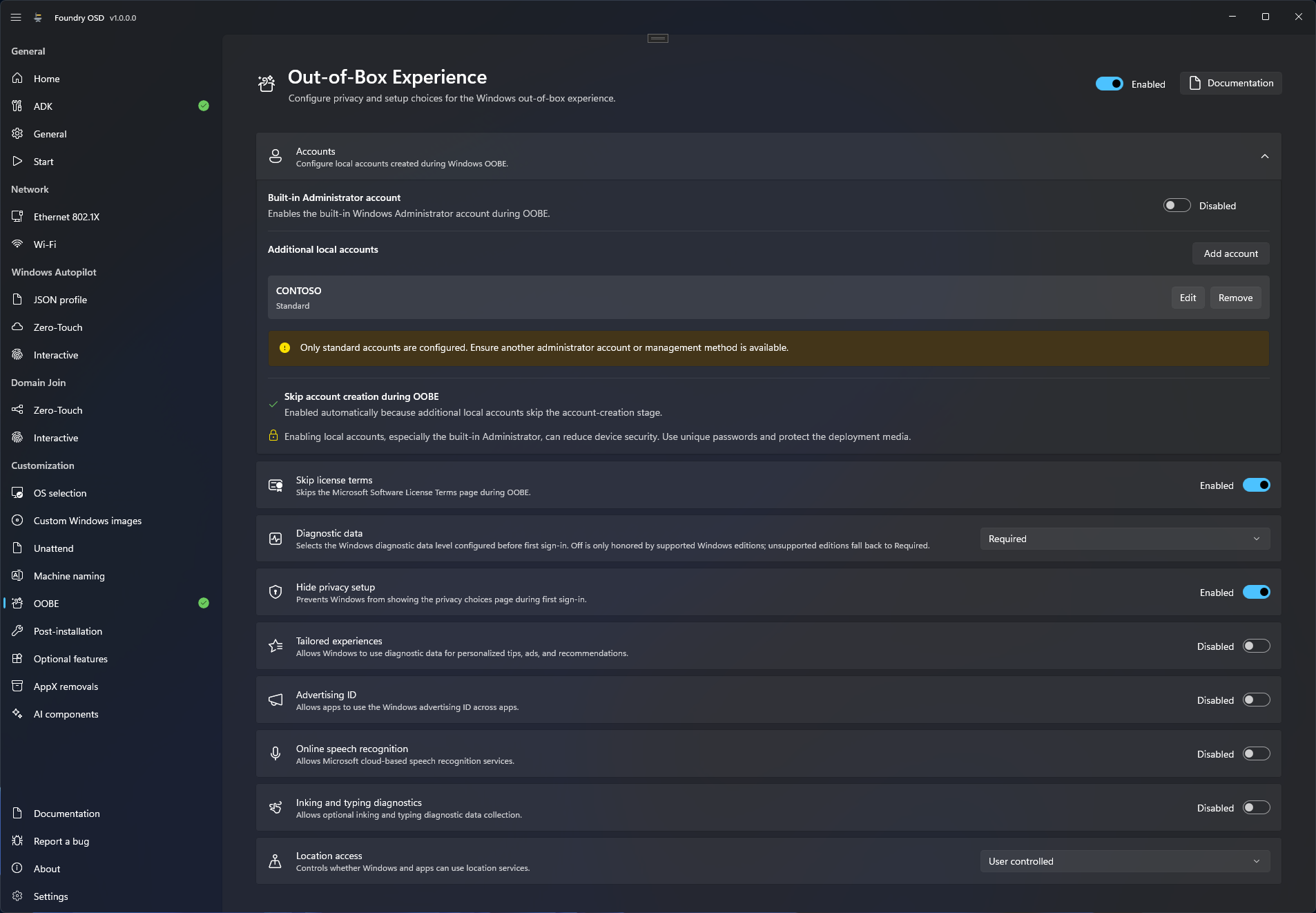
**OOBE** sets what Windows asks during its first-run setup, the out-of-box experience: the license terms page, the privacy choices, and the local accounts Foundry creates. In the app, the page is titled **Out-of-Box Experience**.
With only standard accounts, the page warns that another administrator account or management method must be available.
## Configure OOBE
1. Open **Customization > OOBE** and turn the switch at the top right to **Enabled**.
2. Set the setup and privacy options below.
3. Expand **Accounts** to add local accounts. See [Local accounts](#local-accounts).
4. Create or update the deployment media.
| Option | Default | Effect on the deployed Windows |
| --------------------------------- | ------------------- | ------------------------------------------------------------------------------------------------------------------------------------------------------------------------------- |
| **Skip license terms** | **Enabled** | Windows does not show the Microsoft Software License Terms page. |
| **Diagnostic data** | **Required** | Sets the diagnostic data level to **Required**, **Optional** or **Off**. **Off** is honored only by the Windows editions that support it; the others fall back to **Required**. |
| **Hide privacy setup** | **Enabled** | Windows does not show the privacy choices page at the first sign-in. |
| **Tailored experiences** | **Disabled** | When **Disabled**, Windows does not use diagnostic data for personalized tips, ads and recommendations. |
| **Advertising ID** | **Disabled** | When **Disabled**, apps cannot use the Windows advertising ID. |
| **Online speech recognition** | **Disabled** | When **Disabled**, Microsoft cloud-based speech recognition is turned off. |
| **Inking and typing diagnostics** | **Disabled** | When **Disabled**, optional inking and typing diagnostic data is not collected. |
| **Location access** | **User controlled** | **User controlled** leaves location to the user. **Force off** denies location access to apps. |
Foundry Deploy writes these choices into the installed Windows in Windows PE, in the **Configure Windows setup** step. The privacy choices are written as policies: a Group Policy or Intune setting applied later replaces them.
## Local accounts
Expand **Accounts** on the page.
* **Built-in Administrator account** (**Disabled** by default) enables the Windows built-in Administrator account.
* **Additional local accounts**: select **Add account**, then enter the **Username** and choose the **Account type**, **Standard** or **Administrator**. Use **Edit** and **Remove** on an account row to change it.
Each account has a **Set a password** switch, **Enabled** by default. Leave it on and enter the password twice, or turn it off to give the account a blank password. Avoid a blank password on an administrator account.
A username has at most 256 characters, cannot contain `" / \ [ ] : ; | = , + * ? < > % @`, cannot end with a period or a space, and must be unique. The names `Administrator`, `DefaultAccount`, `Guest`, `HelpAssistant`, `NONE`, `WDAGUtilityAccount` and `WSIAccount` are reserved.
### What Windows does with the accounts
* **With at least one additional account**, Windows skips its account creation pages and the online account pages. The read-only row **Skip account creation during OOBE** shows this.
* **With only the built-in Administrator account**, Windows still shows its own account creation pages.
* Foundry does not configure automatic sign-in.
If every account is **Standard** and the built-in Administrator account is **Disabled**, the page warns: "Only standard accounts are configured. Ensure another administrator account or management method is available." The warning does not block media creation.
### Password protection
* **A predefined password needs a Deployment password.** Turn on [Password protection](/foundry-osd/general.md#password-protection) on **General**. Without it, the **Accounts** section and **Start** show **Needs attention** and Foundry OSD cannot create media. A blank password does not need it.
* **Passwords are saved with the configuration** when **Remember passwords** is on, which is the default. When it is off, enter them again each time you start Foundry OSD. See [Settings backup and sync](/foundry-osd/deployment-profiles.md).
* **On the device**, Windows Setup receives the password in its answer file, hidden but not encrypted. Treat copies of that file as sensitive. See [Security and credentials](/reference/security-and-credentials.md).
## Limits
* **A custom answer file replaces this whole page.** When the technician selects one, Foundry applies none of the options above, including the local accounts. See [What a custom answer file overrides](/foundry-osd/customization/unattend.md#what-a-custom-answer-file-overrides).
* **Windows Autopilot and additional local accounts exclude each other.** The page shows "Autopilot cannot be combined with additional local accounts." and **Add account** is unavailable. Existing accounts can still be edited or removed: remove them or turn Autopilot off. The built-in Administrator account stays available with Autopilot.
## Related
* [Password protection](/foundry-osd/general.md#password-protection)
* [Unattend](/foundry-osd/customization/unattend.md)
* [Review and deploy](/foundry-deploy/review-and-deploy.md)
* [Windows deployment troubleshooting](/troubleshooting/deployment.md)
---
# Agent Instructions
This documentation is published with GitBook. GitBook is the documentation platform designed so that both humans and AI agents can read, navigate, and reason over technical content effectively. Learn more at gitbook.com.
## Querying This Documentation
If you need additional information that is not directly available in this page, you can query the documentation by asking a question.
Perform an HTTP GET request on the following URL with the `ask` and `goal` query parameters:
```
GET https://docs.foundryosd.com/foundry-osd/customization/oobe.md?ask=&goal=
```
`ask` is the immediate question: it should be specific, self-contained, and written in natural language.
`goal` is what the user is ultimately trying to achieve, the reason they need the answer. Sharing it helps GitBook give you a better, more relevant answer. A goal is most helpful when it describes the outcome the user wants rather than restating the question. For example, with `ask=how do I create an API token`, a goal like `automate deployments from our CI pipeline` lets GitBook tailor the answer to that use case.
The response will contain a direct answer to the question and relevant excerpts and sources from the documentation.
Use this mechanism when the answer is not explicitly present in the current page, you need clarification or additional context, or you want to retrieve related documentation sections.