> For the complete documentation index, see [llms.txt](https://docs.foundryosd.com/llms.txt). Markdown versions of documentation pages are available by appending `.md` to page URLs; this page is available as [Markdown](https://docs.foundryosd.com/foundry-osd/customization/appx-removals.md).
# AppX removals
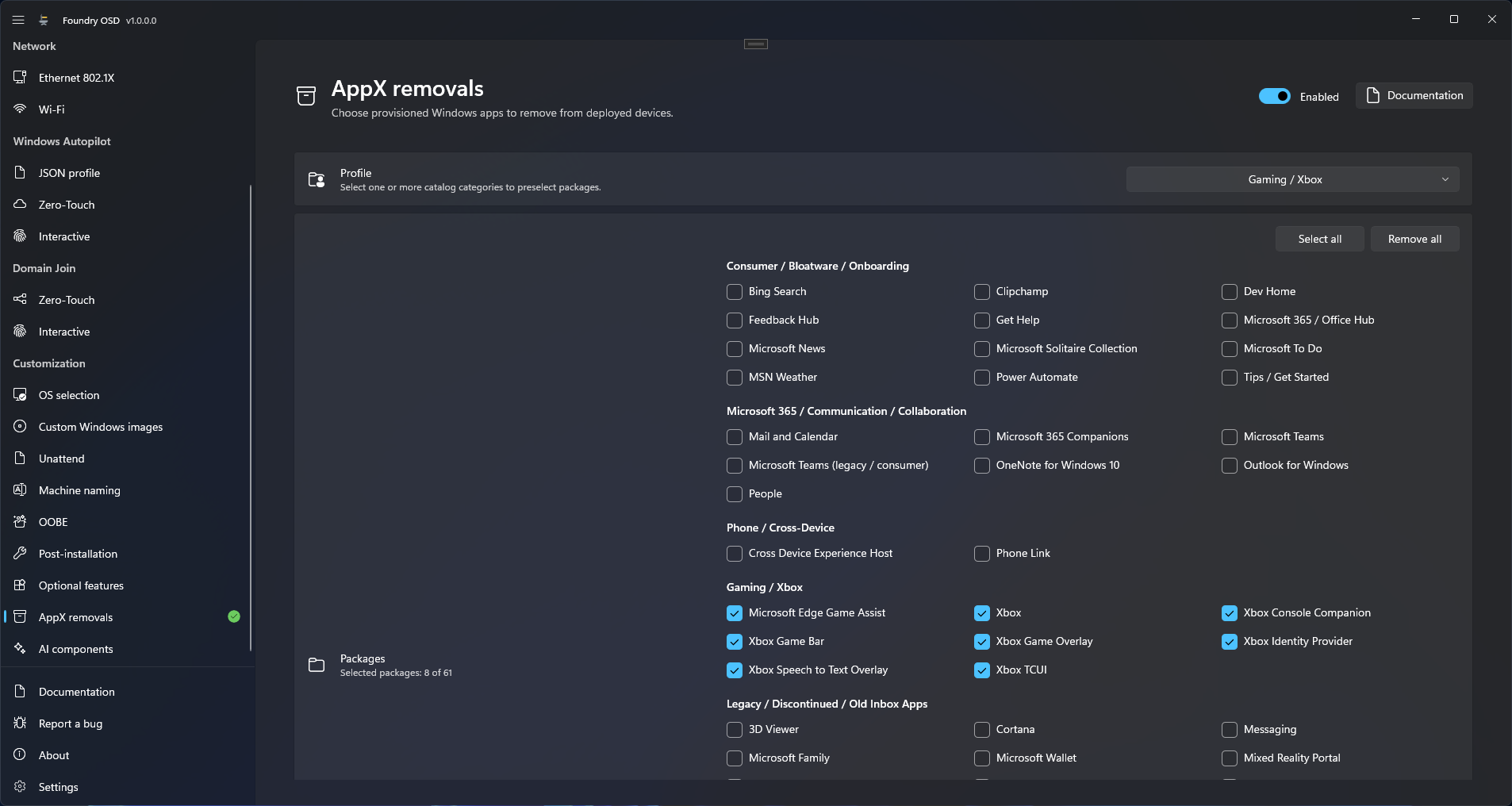
**AppX removals** removes built-in Windows apps, such as Clipchamp, Xbox or Microsoft Teams, from the deployed Windows so that new users do not receive them.
Tick the apps to remove under Packages, or tick whole groups with Profile.
## Select the apps to remove
1. Open **Customization > AppX removals** and turn the switch at the top right to **Enabled**.
2. Under **Packages**, tick each app to remove. **Select all** ticks all 61 apps and **Remove all** clears the selection.
3. To tick a whole group, open **Profile** and tick the group.
4. Check the counter under **Packages**, for example "Selected packages: 20 of 61".
5. Create or update the deployment media.
The list is built into Foundry OSD. You cannot add an app to it. To remove anything else, use a script in [Post-installation](/foundry-osd/customization/post-installation.md).
### Groups and profiles
The 61 apps are sorted into seven groups, listed at the end of this section. A profile is one of these groups: ticking it in **Profile** ticks every app of the group, and clearing it clears them.
The **Profile** box summarizes the selection: **None**, the name of the group when exactly one whole group is ticked, **Selected profiles: 2** for several whole groups, or **Custom** when the ticked apps do not match whole groups.
{% hint style="warning" %}
**Utilities / Native Apps** contains Notepad, Calculator, Photos, Snipping Tool, Paint, Windows Terminal, Camera, Clock, Sound Recorder, Media Player, Sticky Notes and Quick Assist. **Select all** removes them too.
{% endhint %}
All 61 apps by group
| Group | Apps |
| --------------------------------------------- | ------------------------------------------------------------------------------------------------------------------------------------------------------------------------------------------------------ |
| Consumer / Bloatware / Onboarding | Bing Search, Clipchamp, Dev Home, Feedback Hub, Get Help, Microsoft 365 / Office Hub, Microsoft News, Microsoft Solitaire Collection, Microsoft To Do, MSN Weather, Power Automate, Tips / Get Started |
| Microsoft 365 / Communication / Collaboration | Mail and Calendar, Microsoft 365 Companions, Microsoft Teams, Microsoft Teams (legacy / consumer), OneNote for Windows 10, Outlook for Windows, People |
| Phone / Cross-Device | Cross Device Experience Host, Phone Link |
| Gaming / Xbox | Microsoft Edge Game Assist, Xbox, Xbox Console Companion, Xbox Game Bar, Xbox Game Overlay, Xbox Identity Provider, Xbox Speech to Text Overlay, Xbox TCUI |
| Legacy / Discontinued / Old Inbox Apps | 3D Viewer, Cortana, Messaging, Microsoft Family, Microsoft Wallet, Mixed Reality Portal, Mobile Plans, Movies & TV, Paint 3D, Print 3D, Skype, Windows Maps |
| Utilities / Native Apps | Calculator, Camera, Clock, Media Player, Notepad, Paint, Photos, Quick Assist, Snipping Tool, Sound Recorder, Sticky Notes, Windows Terminal |
| Microsoft First-Party / Optional | Microsoft Journal, Microsoft News, Microsoft PC Manager, Microsoft Remote Desktop, Microsoft Whiteboard, Network Speed Test, Power BI, Sway |
## What happens on the device
Foundry removes the apps at the first start of Windows, before the first sign-in, even when the Post-installation page is off. See [When each customization is applied](/foundry-osd/customization.md#when-each-customization-is-applied).
* **What is removed.** Foundry removes the provisioned package, which is the copy Windows installs for each new user. It does so before anyone signs in.
* **An app the image does not contain is skipped.** Nothing is reported for it.
* **A failed removal does not stop the deployment.** Foundry records a warning and continues with the next app.
* **An app can come back.** Foundry sets no policy that blocks the app. Windows, the Microsoft Store or a later feature update can install it again.
## Check the result
After the restart, the Foundry Post-installation console lists the task `Remove AppX packages`. On the deployed device, sign in with a new user account and confirm that the apps are absent. If one is still there, read the removal log:
```
C:\Windows\Temp\Foundry\Logs\PreOobe\appx-servicing.log
```
## Limits
* Microsoft Copilot is not in this list. Remove it on [AI components](/foundry-osd/customization/ai-components.md).
* The selection is saved only while the page is **Enabled**. A selection left on a page that is **Disabled** is gone the next time Foundry OSD starts.
## Related
* [AI components](/foundry-osd/customization/ai-components.md)
* [Post-installation](/foundry-osd/customization/post-installation.md)
* [After the restart](/foundry-deploy/after-the-restart.md)
* [After the restart troubleshooting](/troubleshooting/after-the-restart.md)
---
# Agent Instructions
This documentation is published with GitBook. GitBook is the documentation platform designed so that both humans and AI agents can read, navigate, and reason over technical content effectively. Learn more at gitbook.com.
## Querying This Documentation
If you need additional information that is not directly available in this page, you can query the documentation by asking a question.
Perform an HTTP GET request on the following URL with the `ask` and `goal` query parameters:
```
GET https://docs.foundryosd.com/foundry-osd/customization/appx-removals.md?ask=&goal=
```
`ask` is the immediate question: it should be specific, self-contained, and written in natural language.
`goal` is what the user is ultimately trying to achieve, the reason they need the answer. Sharing it helps GitBook give you a better, more relevant answer. A goal is most helpful when it describes the outcome the user wants rather than restating the question. For example, with `ask=how do I create an API token`, a goal like `automate deployments from our CI pipeline` lets GitBook tailor the answer to that use case.
The response will contain a direct answer to the question and relevant excerpts and sources from the documentation.
Use this mechanism when the answer is not explicitly present in the current page, you need clarification or additional context, or you want to retrieve related documentation sections.