> For the complete documentation index, see [llms.txt](https://docs.foundryosd.com/llms.txt). Markdown versions of documentation pages are available by appending `.md` to page URLs; this page is available as [Markdown](https://docs.foundryosd.com/foundry-osd/customization/ai-components.md).
# AI components
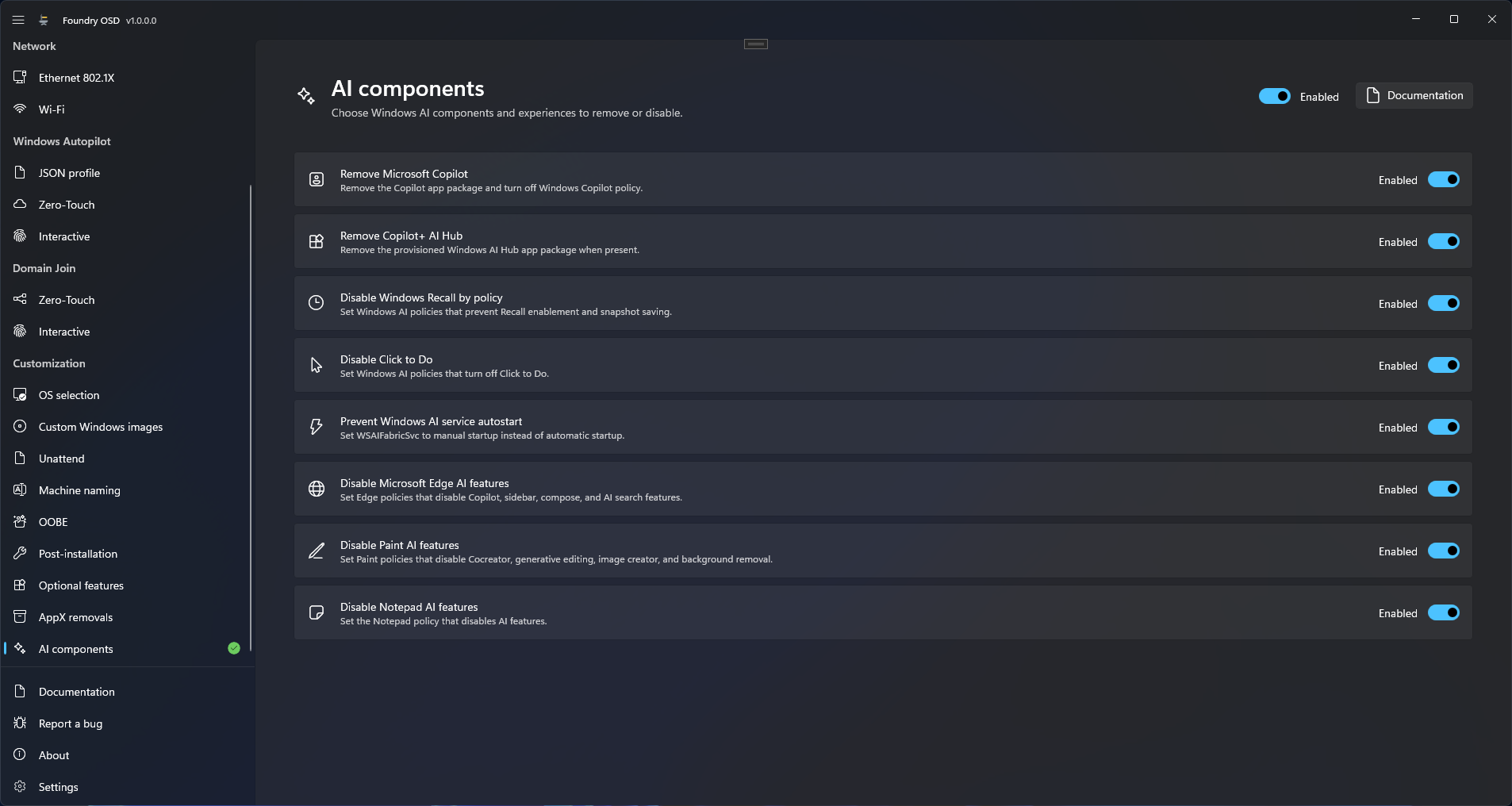
**AI components** removes the Copilot and AI Hub apps and turns off Windows AI features in the deployed Windows. Two of its eight actions remove an app. The other six set a policy or a service start type and remove nothing.
Each action has its own switch. Turning the page on turns on all eight.
## Choose the actions
1. Open **Customization > AI components**.
2. Turn the switch at the top right to **Enabled**. Foundry OSD turns on all eight actions.
3. Turn off the actions you do not want. Turning off the last one switches the whole page to **Disabled**.
4. Create or update the deployment media.
| Action | What it does to the deployed Windows | Applied |
| ---------------------------------------- | ------------------------------------------------------------------------------------------------------------------ | ------------------------------------------------------- |
| **Remove Microsoft Copilot** | Removes the Copilot app, turns off Windows Copilot by policy and hides the Copilot taskbar button for new users. | Policy in Windows PE, app at the first start of Windows |
| **Remove Copilot+ AI Hub** | Removes the Windows AI Hub app when the image contains it. | First start of Windows |
| **Disable Windows Recall by policy** | Sets policies that prevent Recall from being turned on and from saving snapshots. | Windows PE |
| **Disable Click to Do** | Sets the policy that turns off Click to Do. | Windows PE |
| **Prevent Windows AI service autostart** | Sets the `WSAIFabricSvc` service to manual start instead of automatic start. | Windows PE |
| **Disable Microsoft Edge AI features** | Sets eight Microsoft Edge policies that turn off Copilot, the sidebar, compose and AI search features. | Windows PE |
| **Disable Paint AI features** | Sets five Paint policies that turn off Cocreator, generative fill and erase, image creator and background removal. | Windows PE |
| **Disable Notepad AI features** | Sets the Notepad policy that turns off its AI features. | Windows PE |
## What happens on the device
* **Policies and the service setting** are written into the installed Windows in Windows PE, in the **Configure AI policies** step, after Windows is applied to the disk.
* **The two apps** are removed at the first start of Windows, before the first sign-in, even when the Post-installation page is off. See [When each customization is applied](/foundry-osd/customization.md#when-each-customization-is-applied). Foundry removes the provisioned package, as [AppX removals](/foundry-osd/customization/appx-removals.md) does. An app the image does not contain is skipped, and a failed removal is recorded as a warning without stopping the deployment.
* **A later policy wins.** A Group Policy or Intune setting applied after deployment replaces the policies Foundry wrote.
## Check the result
When a policy action is on, the **Configure AI policies** step of Foundry Deploy completes and the log contains "Offline AI policies configured." With only **Remove Copilot+ AI Hub** on, **Steps** has no **Configure AI policies** step, because that app is removed after the restart. After the restart, the Foundry Post-installation console lists the task `Remove AI components`, and the removal is recorded in:
```
C:\Windows\Temp\Foundry\Logs\PreOobe\appx-servicing.log
```
## Limits
* **No compatibility check.** The page does not tell you whether a Windows version or edition honours a policy. Foundry writes the policy in every case.
* **Recall.** **Disable Windows Recall by policy** leaves the Recall component in Windows. To add or remove the component, set **Recall** on [Optional features](/foundry-osd/customization/optional-features.md). The two settings are independent.
* **Paint and Notepad.** **Disable Paint AI features** and **Disable Notepad AI features** have no purpose when the same media removes Paint and Notepad through [AppX removals](/foundry-osd/customization/appx-removals.md).
* **Fixed list.** You cannot add an action. Use a script in [Post-installation](/foundry-osd/customization/post-installation.md) for anything else.
## Related
* [AppX removals](/foundry-osd/customization/appx-removals.md)
* [Optional features](/foundry-osd/customization/optional-features.md)
* [Review and deploy](/foundry-deploy/review-and-deploy.md)
* [After the restart troubleshooting](/troubleshooting/after-the-restart.md)
---
# Agent Instructions
This documentation is published with GitBook. GitBook is the documentation platform designed so that both humans and AI agents can read, navigate, and reason over technical content effectively. Learn more at gitbook.com.
## Querying This Documentation
If you need additional information that is not directly available in this page, you can query the documentation by asking a question.
Perform an HTTP GET request on the following URL with the `ask` and `goal` query parameters:
```
GET https://docs.foundryosd.com/foundry-osd/customization/ai-components.md?ask=&goal=
```
`ask` is the immediate question: it should be specific, self-contained, and written in natural language.
`goal` is what the user is ultimately trying to achieve, the reason they need the answer. Sharing it helps GitBook give you a better, more relevant answer. A goal is most helpful when it describes the outcome the user wants rather than restating the question. For example, with `ask=how do I create an API token`, a goal like `automate deployments from our CI pipeline` lets GitBook tailor the answer to that use case.
The response will contain a direct answer to the question and relevant excerpts and sources from the documentation.
Use this mechanism when the answer is not explicitly present in the current page, you need clarification or additional context, or you want to retrieve related documentation sections.